Platform Overview
Radegast EDR is a privacy-focused Endpoint Detection and Response platform perfect for smaller teams, home labbers, and families. With complete end-to-end encryption (E2EE), your log data remains private and secure — the server stores only encrypted data it cannot read, giving you full control over your security information.
Why Radegast EDR?
Real-time Threat Detection: Monitor your endpoints for suspicious activities and potential security breaches
Centralized Monitoring: View all security alerts from across your endpoints in one unified dashboard
Complete Privacy: All log data is encrypted end-to-end using age encryption; the server never has access to your private keys or decrypted log contents
Flexible Collaboration: Organize your security operations with teams, device groups, and granular permissions
Custom Detection Rules: Create and manage detection policies tailored to your needs
Noise Reduction: Use exclusions to filter out known-safe activities and reduce alert fatigue
Perfect for Smaller-Scale Deployments
Radegast EDR is specifically designed with smaller teams, home labbers, and families in mind:
Zero Infrastructure: Built-in SQLite database means no external database server required — you don’t need to host any custom infrastructure if you don’t want to
Self-Hosted: Run on a single machine or small VPS — no complex distributed setup
Privacy by Design: Complete E2EE ensures your data stays yours; the server cannot read your logs
No Vendor Lock-in: Open source with standard encryption (age) — you control your data
Easy to Deploy: Single container deployment with Podman or Docker
Cost Effective: No per-device licensing, no cloud fees, no hidden costs
Core Components
Dashboard
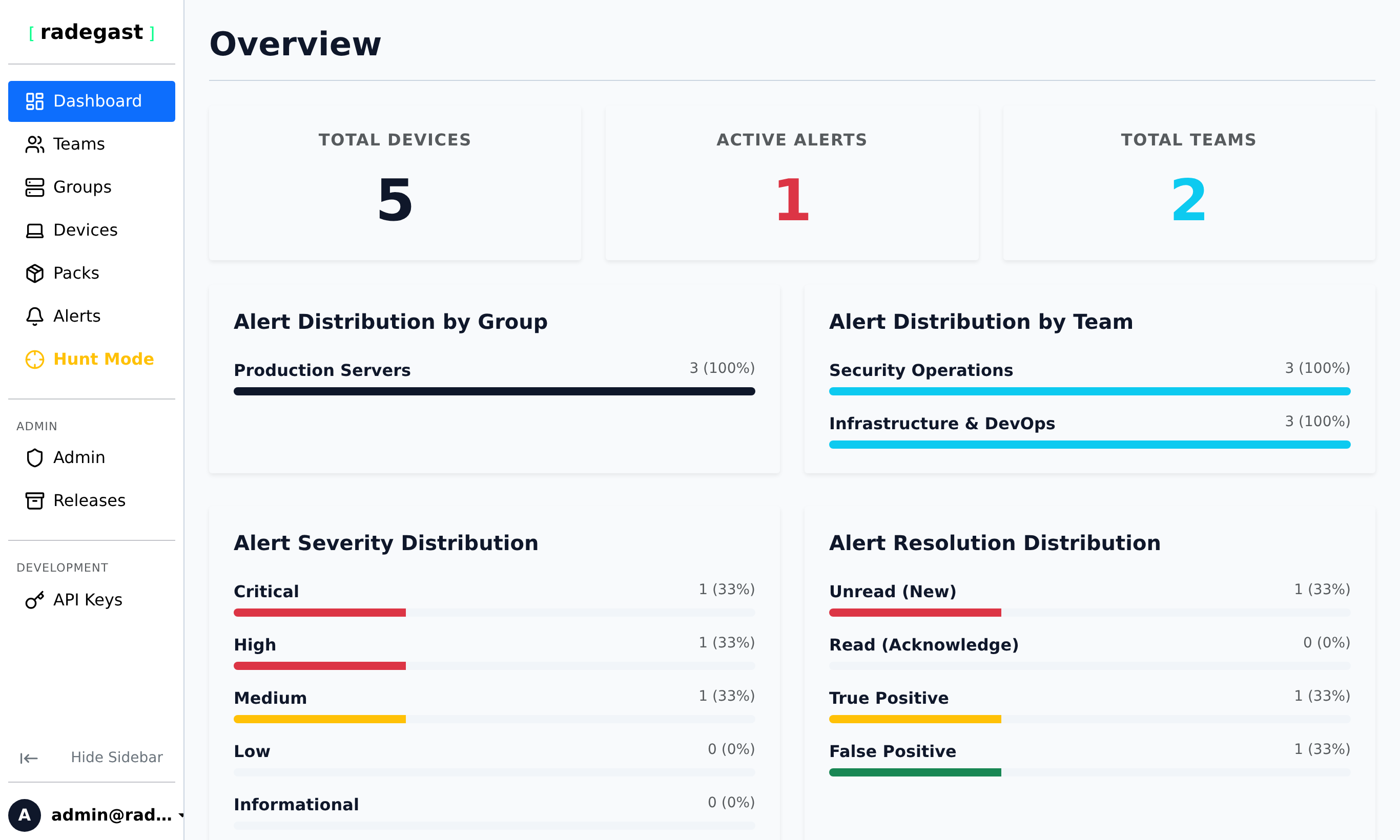
Your central hub for monitoring security status across all your endpoints. The dashboard provides:
At-a-glance overview of alert severity levels (Critical, High, Medium, Low, Informational)
Summary of unread vs. resolved alerts
Distribution of alerts by team and device group
Quick access to recent security events
Alerts & Logs
The heart of your security monitoring:
Alerts: Security events that require your attention, categorized by severity
Logs: Detailed, encrypted records of endpoint activities
Triage: Mark alerts as read, resolve them, or add notes for your team
Search & Filter: Find specific events by time range, severity, or other criteria
Devices
The endpoints you’re protecting:
Device Registration: Add new endpoints to your monitoring
Authorization Tokens: Secure tokens for agent authentication
Status Monitoring: Track when devices were last seen and their agent versions
Group Organization: Assign devices to groups for easier management
Teams & Groups
Organizational structure for your security operations:
Teams: Groups of users with shared access to devices and alerts
Device Groups: Collections of endpoints that share configuration and permissions
Permission Levels: Control what each team can do (view logs, manage devices, etc.)
Detection Packs
Your security policies:
Policy Definitions: YAML or binary configuration files defining detection rules
Version Management: Track different versions of your detection policies
Team Sharing: Assign packs to specific teams. Only Admins and Maintainers can create public packs (available to all users). Normal users can only create packs and share them with teams they belong to.
Exclusions
Reduce noise from known-safe activities:
Custom Filters: Create JSONata queries to exclude specific event patterns
Group-Specific: Apply exclusions to specific device groups
False Positive Management: Prevent alert fatigue from expected behaviors
How It Works
Agent Installation: Install the Radegast agent on your endpoints
Event Collection: Agents monitor system activities and generate security events
Data Encryption: Events are encrypted using age encryption before transmission
Secure Transmission: Encrypted logs are sent to the Radegast backend
Alert Generation: Events are processed and alerts are created based on severity
User Notification: You receive notifications for critical events (configurable)
Investigation: You view, decrypt, and triage alerts in the web console
Response: Take action based on your findings
Security Model
Radegast EDR uses a defense-in-depth approach:
End-to-End Encryption: All log data is encrypted on the endpoint before transmission and can only be decrypted with your private key
Multi-Factor Authentication: Protect your account with MFA (OTP, hardware tokens, or WebAuthn)
Granular Permissions: Control exactly what each user and team can access
Secure Tokens: Device authorization uses cryptographically secure tokens
Private Key Management: Your encryption keys never leave your browser
Use Cases
Threat Detection
Monitor for malicious processes, unauthorized access, or suspicious network connections
Receive immediate alerts for critical security events
Investigate incidents with detailed log data
Incident Response
Quickly identify affected endpoints during a security incident
Correlate events across multiple devices
Track the scope and impact of security breaches
Security Operations
Centralize monitoring for distributed teams
Share alert visibility across team members
Collaborate on security investigations
Note: Some alert functionality, particularly extended triage features, is only available when Extended EDR mode is enabled.
Getting Started
To begin using Radegast EDR:
Register your account
Log in and set up MFA
Generate your encryption key pair
Create your first team
Set up device groups
Add your first device
Install the agent on your endpoint
Monitor the dashboard for alerts